之前在Blend中创建一个图像笔刷需要很多步骤。Blend3中对此进行了改进。
复制一个图像到剪贴板
粘贴图像到Resource Dictionary
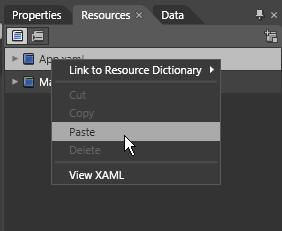
打开Blend 3 并选择 Resource标签,选择可定义图像笔刷的资源区域。右键点击App.xaml文件并选择粘贴Paste。
增加下列xaml代码到App.xaml文件中Application.Resources部分
之前在Blend中创建一个图像笔刷需要很多步骤。Blend3中对此进行了改进。
复制一个图像到剪贴板
粘贴图像到Resource Dictionary
打开Blend 3 并选择 Resource标签,选择可定义图像笔刷的资源区域。右键点击App.xaml文件并选择粘贴Paste。
增加下列xaml代码到App.xaml文件中Application.Resources部分
技术贴,我路过。 :lala